
To perform a precise RTK (Real-Time Kinematic) survey, you’ll need two key components: a rover and a base station that provides real-time GNSS correction data.
When it comes to choosing a base station, there are two main options:
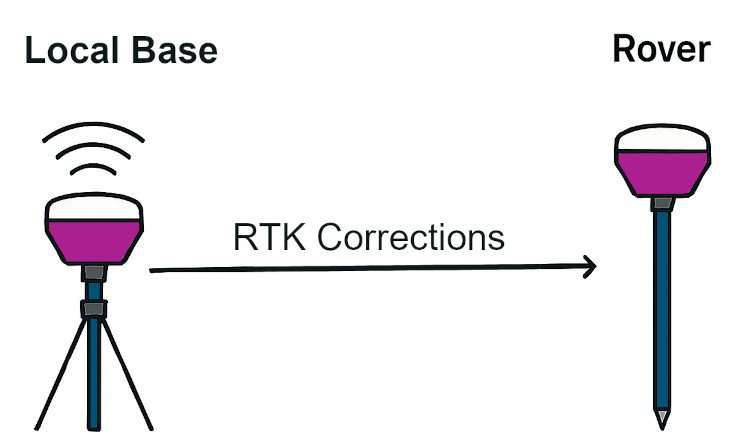
Local Base Station
You can use your own base station positioned near your survey site. This setup ensures strong signal quality and minimal latency.Remote Base via NTRIP
Alternatively, you can connect to a remote base station using NTRIP (Networked Transport of RTCM via Internet Protocol). This method allows you to access correction data over the internet, offering flexibility and convenience—especially when a local base isn’t available.
Each option has its advantages depending on your location, connectivity, and survey requirements.
What is NTRIP?
NTRIP (Networked Transport of RTCM via Internet Protocol) is a technology that enables GPS/GNSS rovers to receive real-time correction data over the internet—eliminating the need for a nearby base station.
Originally developed in 2004 by the German Federal Agency for Cartography and Geodesy, NTRIP has become a widely adopted solution for enhancing positioning accuracy in RTK (Real-Time Kinematic) surveying. By streaming correction data from remote base stations, NTRIP allows surveyors to work more flexibly and efficiently across various locations.
The Three Components of NTRIP
NTRIP operates through three essential parts that work together to deliver real-time GNSS corrections:
Base Station
This is a GNSS receiver set up at a fixed, known location. In Emlid’s case, users typically use a Reach RS3 configured as the base to generate correction data.Caster
The caster acts as a relay server, transmitting correction data from the base to the rover via the internet. Emlid provides a free NTRIP caster that allows users to easily stream corrections from their own base station.Rover
The rover receives the correction data and applies it to improve positioning accuracy. With Emlid, this is often a second Reach RS3 configured as the rover.
Together, these components enable high-precision RTK surveying without the need for a local connection between the base and rover.
Base Station Setup Options for Your Own Base with NTRIP Caster
When using NTRIP, there are flexible setup options available depending on your equipment and survey needs. One common approach is to use your own base station and stream corrections via an NTRIP caster.
Emlid provides a free NTRIP caster, allowing users to transmit correction data from their Reach RS+, Reach RS2 or Reach RS3 base to a rover over the internet.
To use your own base, it must be positioned at a fixed, known location. You can establish this by using one of two options:
- Surveying In the Base: Use a third-party RTK corrections provider to get a FIX and determine accurate coordinates for your base.
- Reverse Survey with Emlid RS3: The RS3 allows you to switch between base and rover modes directly in the firmware. Once your base is permanently mounted, you can temporarily configure it as a rover and use a second RS3 (set up on a known point, such as a trig point within 60 km (nearer is better)) as the base. This method helps you calculate precise coordinates for your mounted unit.
This flexibility makes it easier to set up reliable RTK workflows tailored to your environment.
By using your own NTRIP setup with a caster, you maintain complete control over your RTK workflow—from configuring the base station to operating the rover. While the caster handles the transmission of correction data, the accuracy of your survey ultimately depends on how precisely the base station is established. A correctly positioned base is the cornerstone of achieving reliable, high-precision results.
One limitation of this setup is the maximum effective range for RTK corrections—typically up to 60 km (38 miles) from the base station. If your surveying work consistently falls within this radius, then this configuration is ideal for maintaining high accuracy and reliability.
Experience survey-grade accuracy with ease—discover the Emlid Reach RS3 with tilt compensation here.

Simplify Your RTK Setup with Third-Party Corrections
Using your own base station for RTK positioning can introduce potential errors during setup. To eliminate this risk, we recommend using a trusted third-party RTK corrections provider, such as RTKFnet.
By choosing a corrections provider, you’re outsourcing the setup and management of the base station. They handle the precision setup and broadcast the corrections via the internet—so you don’t have to.
All you need to do is:
- Ensure you have the correct credentials to access the RTK corrections.
- Maintain a stable and reliable internet connection.
This approach streamlines your workflow and enhances positioning accuracy with minimal effort.
One of the key benefits of using a third-party RTK corrections provider is access to a well-established network of base stations. These providers typically maintain a series of base stations strategically positioned across the country to ensure consistent coverage.
Whether the provider relies on a national network like OS Net (operated by Ordnance Survey) or owns and manages its own infrastructure, such as RTKFnet, the result is the same: reliable RTK corrections with a nearby base station available for most survey locations across mainland UK.
This setup enhances accuracy and convenience, making it easier to deploy rovers without worrying about base station placement.
Unlock precision with ease—explore our partner RTK Correction Services now!

What If I Don’t Have Internet Access On-Site?
Set Up a Local Base and Post-Process for Accuracy
When real-time RTK corrections aren’t available, you can still achieve high-precision results by setting up a local base/rover setup and post-processing the data. This method involves placing your GNSS base receiver in single mode and allowing it to record an averaged position over time.
Once the data is collected, you can enhance its accuracy using RINEX files from a trusted source—such as Ordnance Survey in the UK. With tools like Emlid Studio for Static Processing, you can combine your recorded data with the RINEX files to generate a precise base location.
This approach is especially valuable for:
- Remote sites without internet access
- Permanent base setups where long-term accuracy is essential
To ensure consistency for future surveys, it’s important to establish a fixed reference point for your base. This could be:
- The intersection of two permanent white lines
- A bracket mounted on a fence
- A small survey pin embedded in the ground
By marking and reusing this location, you can return to the site and maintain reliable positioning over time.
Accurate Base Positioning Is Critical
To ensure consistent and reliable survey results, it’s essential that your base station’s position is recorded accurately and clearly identified on-site—especially if you plan to return in the future.
Every measurement taken by your rover will be centimetre-accurate relative to the base’s recorded position. If the base is not placed in exactly the same location during future visits, there’s a risk that your survey data or any staking out will be misaligned compared to previous work.
To avoid this, mark the base location with a permanent, identifiable reference point—such as a painted intersection, a fixed bracket, or a survey pin—so it can be precisely repositioned each time.
Conclusion
RTK Corrections via NTRIP
When delivering RTK corrections over NTRIP, both self-hosted and third-party solutions offer distinct advantages:
- Self-hosted base station: Ideal for long-term use, this option provides full control and potential cost savings over time. However, it requires a higher initial investment and careful setup to maintain accuracy—especially within a 60 km radius.
- Third-party correction services: These offer convenience, reliability, and lower upfront costs, with minimal ongoing fees. They’re a great choice for users who prefer a plug-and-play solution.
Regardless of the method, a stable internet connection is crucial. For optimal performance, we recommend using a data-only roaming SIM, which ensures access to the strongest available cellular network, no matter your location.
RTK Corrections from a Local Base
Using a local base station is particularly effective in remote areas with limited or no internet connectivity.
- All positioning results will be centimeter-accurate relative to the local base.
To maintain consistency across visits, the base should be installed over a fixed point or bracket, especially if you plan to return to the site.
To align the survey with broader geospatial references, post-processing with RINEX data is required.